PipeIQ: AI-Powered B2B Sales Acceleration Platform
Most sales tools drown reps in complexity. Most AI tools leave them in the dark. I built PipeIQ from scratch to do neither, a hybrid interface where automation handles the busywork and humans stay in control of every decision.
Role
Product Designer
Timeline
Apr 2023 - Mar 2025
Focus
0→1 Product Design, AI UX, Research

Overview
01
The problem with B2B sales tools
Sales reps in 2023 were living across 6–8 disconnected tools. CRM in one tab, email sequencer in another, lead database in a third. AI features existed everywhere but nobody trusted them, the outputs were a black box.
As founding designer, I built PipeIQ from zero: research, system, and every screen. The goal was a unified platform where AI handled the repetitive work and humans stayed in control of every decision.
Problem
Reps waste hours daily managing tools
instead of selling
Six to eight disconnected apps. No AI that earns trust. Weeks to onboard a new rep.
The tools had become the job.
Solution
One platform where AI handles complexity without hiding it
A hybrid interface, conversational AI where it helps, structured UI where speed matters. Every AI action shows its reasoning.
Market Research
02
I audited 20+ platforms to find the gap
Before drawing anything, I mapped the competitive landscape. Salesforce, HubSpot, Outreach, Apollo, Salesloft, powerful tools, all suffering from the same failure: features built for admins buried under interfaces that required weeks of training before a rep could be productive.







Speaking To Users
03
40 interviews. One consistent thread.
I spoke with SDRs, account executives, and sales managers across company sizes, from two-person startups to enterprise teams. I started every session with: walk me through yesterday. What opened first on your screen?
Tool Chaos
"I spend 3+ hours a day just switching between tools and hunting for data."
Training Nightmares
"It takes our new reps 4-6 weeks to become productive. That's too long."
Black Box AI
"I don't trust AI-generated emails if I don't know why it wrote what it did."
Lost in Features
"There are so many buttons and menus. I only use like 10% of the features."
Research Findings
04
The numbers confirmed what I kept hearing
Secondary data from industry reports reinforced the research themes. Context switching and admin overhead weren't annoyances, they were measurable productivity drains that no existing tool had genuinely solved
70%
of reps lose up to an hour daily switching between 6-8 tools
87%
spend excessive time on admin instead of selling
45%
report measurable productivity loss from context switching
Synthesis
05
The real problem wasn't features, it was trust and fragmentation
After mapping everything, two core tensions emerged. First: reps needed AI to remove friction, but the moment AI made a decision they couldn't see into, they rejected it. Second: every tool solved one job well and ignored everything adjacent. The market had no answer for either.

Concept Exploration
06
We explored the edges before finding the middle
The founding team pushed for a fully chat-based product, no dashboards, no tables. I tested both extremes before landing on the hybrid model. The pivot happened when I played back a specific finding: reviewing 50 leads is faster in a sortable table than asking AI repeatedly. Reps agreed immediately.
Explored · dropped
Chat-only
Frictionless to start, but fails for bulk review, data comparison, and sequence management. Experienced users found it slower than the tools we were replacing.

Explored · dropped
Traditional GUI
Familiar but entirely passive. Doesn't leverage AI meaningfully. Would rebuild the same complexity problem we set out to solve.

Chosen direction
Hybrid interface
AI for insight and drafting. Structured UI for scanning and bulk actions. Users move between modes based on the task, not the product's constraints.

Final Designs
07
Seamlessly move between AI assistance and direct control based on what the task needs
Chat Command Center
Ask questions, trigger actions, and surface insights in natural language. Every AI response shows its source data inline, reps can verify before acting.


Email Transparency
AI-drafted emails with a reasoning panel explaining each choice and its source. Edit inline or regenerate with new parameters.


Campaign Analytics
Live campaign performance with an autopilot toggle, hands-off AI management or full manual control, switchable at any time.


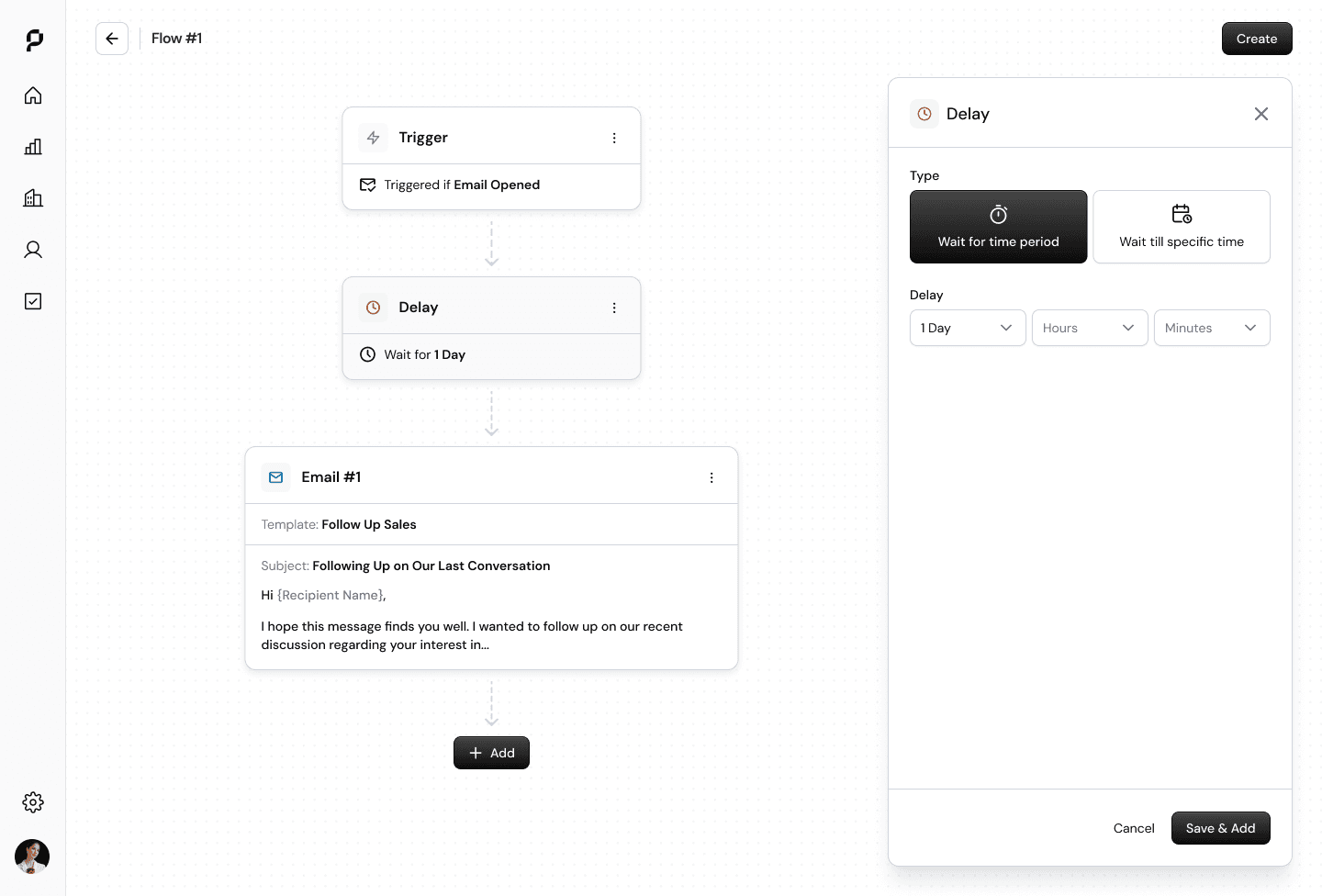
Playbook Flow Builder
Visual sequence editor with conditional branching and AI-suggested templates. No coding, no config files.


What I Learned
08
This experience sharpened my design thinking around AI-human collaboration
AI doesn't have to be all-or-nothing
The best AI products give users choice in automation levels. Forcing pure chat or pure GUI creates friction—hybrid interfaces adapt to user needs and task context.
Transparency is the foundation of trust
Users won't adopt AI features they don't understand. Showing the "why" behind AI decisions builds confidence and helps users learn to work better with the system.
Question assumptions, even from founders
Pushing back on the "chat-only" vision with user research led to a stronger product. Designers have a responsibility to advocate for users, even when it challenges the initial vision.